
If you are encountering issues with your game crashing on PC there are a few files that can be sent across to Support in order to assist the dev team in resolving this as quickly as possible.
Sending across the following files would greatly assist the hard-working mice solve your issue:
Sending across the following files would greatly assist the hard-working mice solve your issue:
- Crash Logs
- Crash Dumps
- DxDiag
You can locate these files on your machine by following these steps:
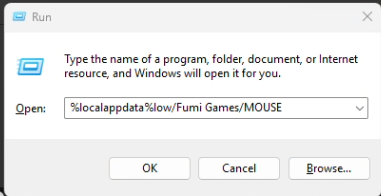
To find your Crash Log file, please follow:
- Open the start menu and open "Run"
- Enter
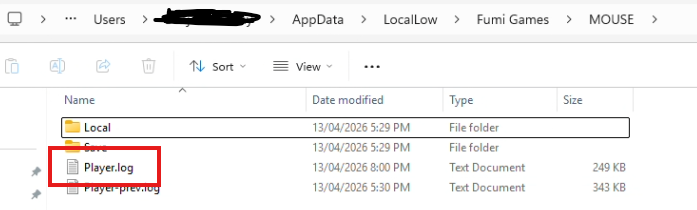
%localappdata%low/Fumi Games/MOUSE - Find and send the
Player.logfile
To find your Crash Dump file, please follow:
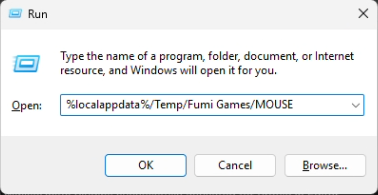
- Open the start menu and open "Run"
- Enter
%localappdata%/Temp/Fumi Games/MOUSE - Find and send everything in the folder
To create a DxDiag Report, please follow:
- Press Windows key + R
- Type: dxdiag
- Press Enter
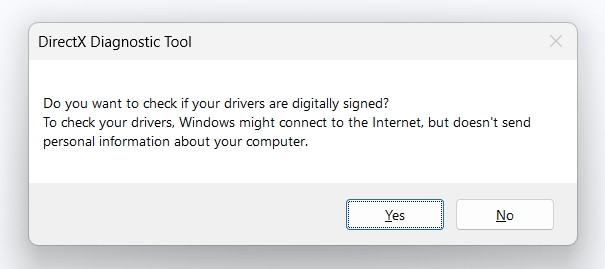
- If prompted, click yes
- Wait for the progress bar to finish
- Click Save All Information
- Save the file somewhere easy to find, e.g. Desktop as DxDiag.txt
Sending these through to Community & Support agents would greatly assist the dev teams of Mouseburg in resolving your issue!